Most people think of AI as a question-and-answer machine. You ask, it responds. But that model breaks down the moment you need continuity. Memory. Context that evolves.
That's where Claude's Cowork feature changes everything. It's not a chatbot. It's a persistent workspace where context accumulates, decisions get tracked, and workflows actually compound over time.
What is Cowork, really?
Cowork is Claude's collaborative environment that lets you build, refine, and revisit projects with full memory. Think of it as a living document meets an intelligent assistant.
Unlike traditional chat threads that scroll into oblivion, Cowork sessions retain structure. You can return to a financial dashboard you built last week, update a budget model mid-month, or hand off a partially complete project to a teammate without losing a single detail.
It's designed for iteration, not one-off queries.
Cowork vs. OpenClaw: the clearest analogy I have found
If you have been in AI circles recently, you have probably heard of OpenClaw, the open-source personal AI agent that went viral earlier this year. OpenClaw is the self-hosted version of this idea: your AI lives on your machine, talks to your files, and runs with whatever permissions you give it. It is powerful, but you own the setup, the security, and everything that could go wrong.
Cowork is what you get when Anthropic builds that same capability into a managed product. Same core idea, but instead of running on your laptop unguarded, it is built around guardrails, permissions, and auditability: human approvals for risky actions, organization-level controls, and Anthropic’s safety stack underneath it all.
One is a race car you build yourself. The other comes with seat belts, insurance, and a speed limiter your IT team can configure.

How I use Cowork: two real examples
Example 1: learning French
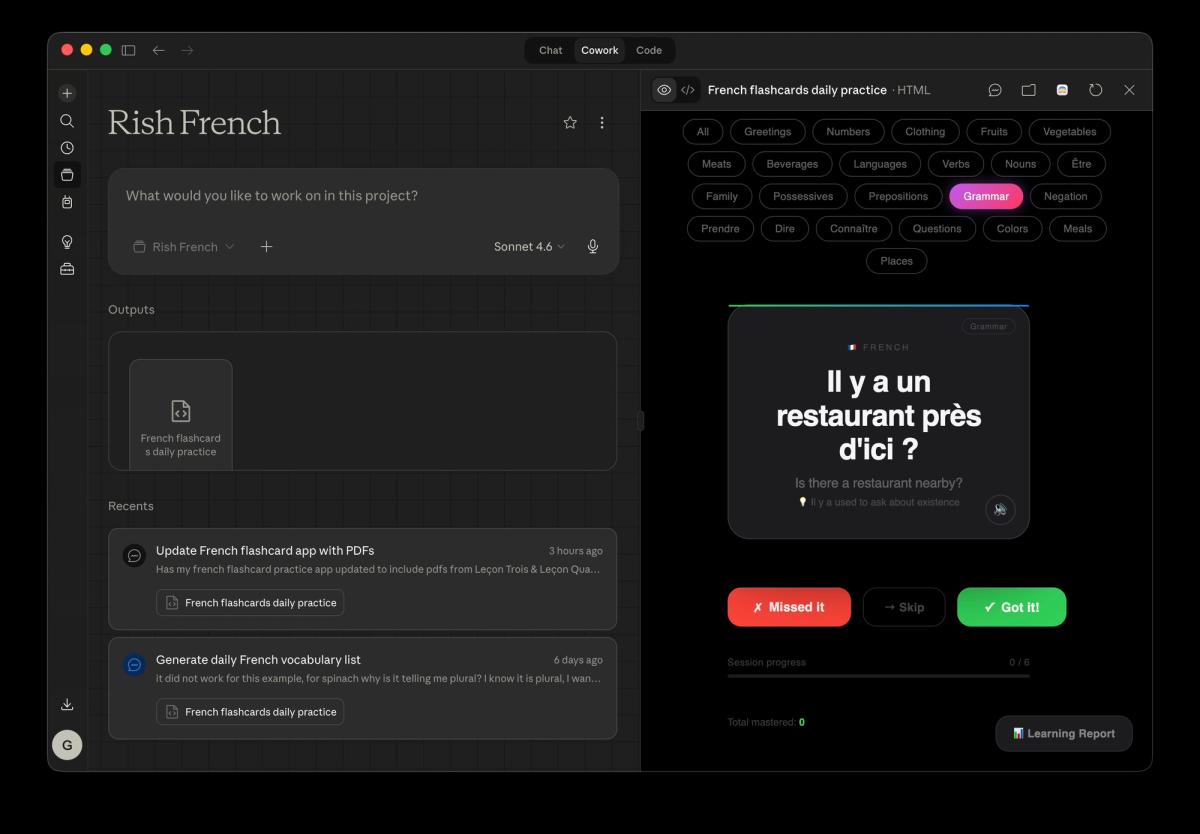
I'm learning French in my spare time, but I've been accumulating lesson PDFs faster than I can review them. So I tried something: I dropped all my French lesson PDFs into a folder that Cowork has access to, then asked it to:
- Organize the files into lesson folders by number (leçon un, deux, trois...)
- Find every French word across all the PDFs and categorize them by theme
- Generate a flashcard set from the vocabulary
- Build a learning progress dashboard so I can see which lessons I have covered and which words keep appearing
The result was a structured study system I would never have built manually. It took me one prompt and about ten minutes of Cowork running in the background. I now open my dashboard before every study session instead of hunting through a folder of unsorted PDFs.
This is the kind of workflow Cowork is genuinely built for: repetitive, file-heavy, multi-step tasks where the output is something you return to over time.
Example 2: personal finance (with a privacy caveat)
I also use Cowork as a lightweight personal CFO. Every month, I download my credit card statements as PDFs, drop them into a dedicated folder, and run through three steps in a single Cowork session:
- Organize: Claude sorts the files into monthly subfolders automatically
- Categorize: Claude reads each statement and tags transactions by spending category
- Update the dashboard: Claude pushes the categorized data into my monthly finance overview
The whole thing takes about five minutes of my time. The rest is Claude doing the file work.
Privacy disclaimer: read this before trying the finance workflow
Giving any AI model access to financial documents comes with real considerations. Before you try this:
- Turn off model training. In Claude's settings, make sure your data is not being used to train future models. On paid plans this is off by default, but verify it.
- Anonymize your documents first. Before uploading any statements, redact your full name, account numbers, card numbers, and home address. The spending data is what matters for analysis, not your identity.
How companies are using Cowork to scale intelligence
While I am using Cowork for personal workflows, enterprises have started deploying it for something far more ambitious.
Zapier is one of the clearest examples. They connected Cowork to their internal database, Slack, and Jira to surface engineering bottlenecks. What they got back was a dashboard, team-by-team analyses, and a prioritized roadmap that both Product and Design Ops then adopted for their own teams. One Cowork session turned into org-wide infrastructure. (Source)
Spotify is another. Engineers had long struggled with code migrations, the slow manual work of updating code across thousands of services. After integrating Claude into the system their engineers already use daily, any engineer can now kick off a large-scale migration just by describing what they need in plain English. (Source)
The New York Stock Exchange is further along than most people realize. NYSE's CTO has publicly described the exchange as "rewiring our engineering process" with Claude, building internal agents that take instructions from a Jira ticket all the way to committed code.
What connects these examples is not the industry or the team size. It is the same pattern I noticed in my own use: Cowork works best when you stop treating AI as something you consult and start treating it as something you delegate to.
Why this matters now
The companies that win in the next decade will not just use AI for automation. They will use it for augmentation, building systems where human intuition and machine intelligence compound over time.
Cowork is one of the first tools that makes that vision tangible for everyone, not just developers. It is not about replacing human decision-making. It is about giving every decision more context, more memory, and more leverage.
Whether you are trying to pass a French exam or run a global engineering org, the principle is the same: the more you invest in building intelligent, persistent workflows, the more those workflows pay dividends.
Stop treating AI like a search engine. Start treating it like a co-worker that never forgets, never loses your files, and gets better the more context you give it.

Written by
Rishabh (Rish) Kaushick
AI Engineer
Rishabh as an AI Engineer at TrueHorizon AI, focused on developing practical AI solutions that automate business workflows and connect data across platforms. Specializes in building backend logic, system integrations, and intelligent processes that transform fragmented operations into streamlined, reliable pipelines. Collaborates closely with product and engineering teams to deploy production-ready systems that improve efficiency and make AI usable in real-world business environments.